3.4 天气数据的采集和更新
学习目标
- 掌握采集天气数据的方法
- 掌握爬取数据和定时更新到数据库的方法
一、数据采集
spider_weather天气数据采集脚本,从 API 获取数据,写入 MySQL。保持数据库实时更新,支持代理查询。数据采集地址:https://dev.qweather.com/docs/api/weather/weather-daily-forecast/
项目中的定位:后台数据源,定时执行。
核心功能:API 请求、数据解析、写入/更新数据库、调度。
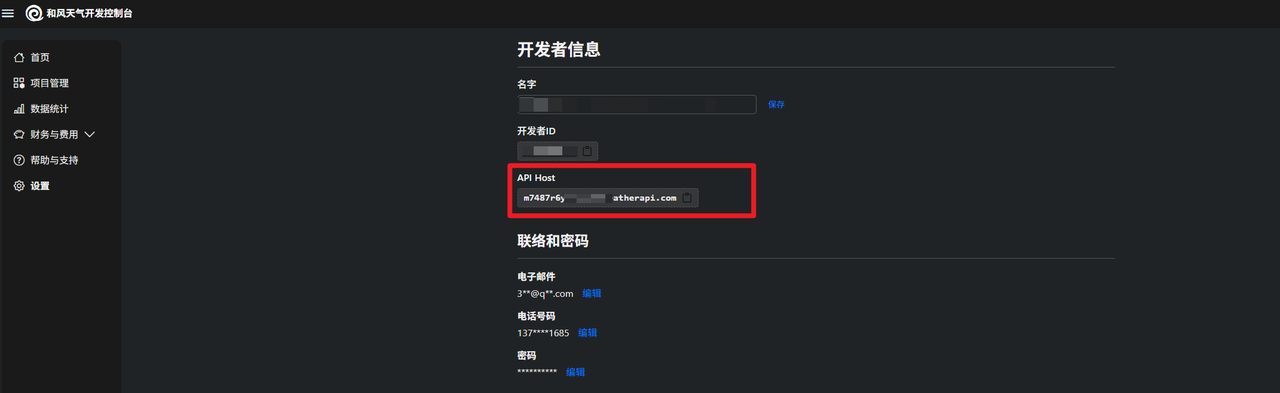
1 API Host申请
| API host介绍 | https://dev.qweather.com/docs/configuration/api-config/ |
|---|---|
| API host查看 | https://console.qweather.com/setting?lang=zh |
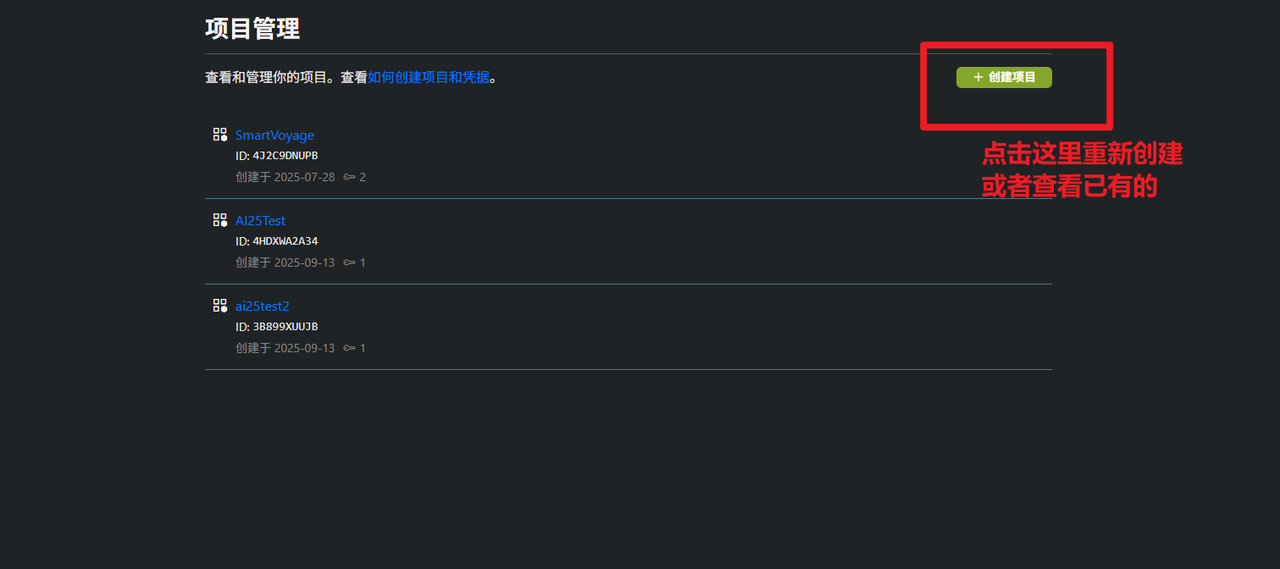
2 API Key申请
| API Key介绍 | https://dev.qweather.com/docs/configuration/authentication/#api-key |
|---|---|
| API Key查看 | https://console.qweather.com/project?lang=zh |
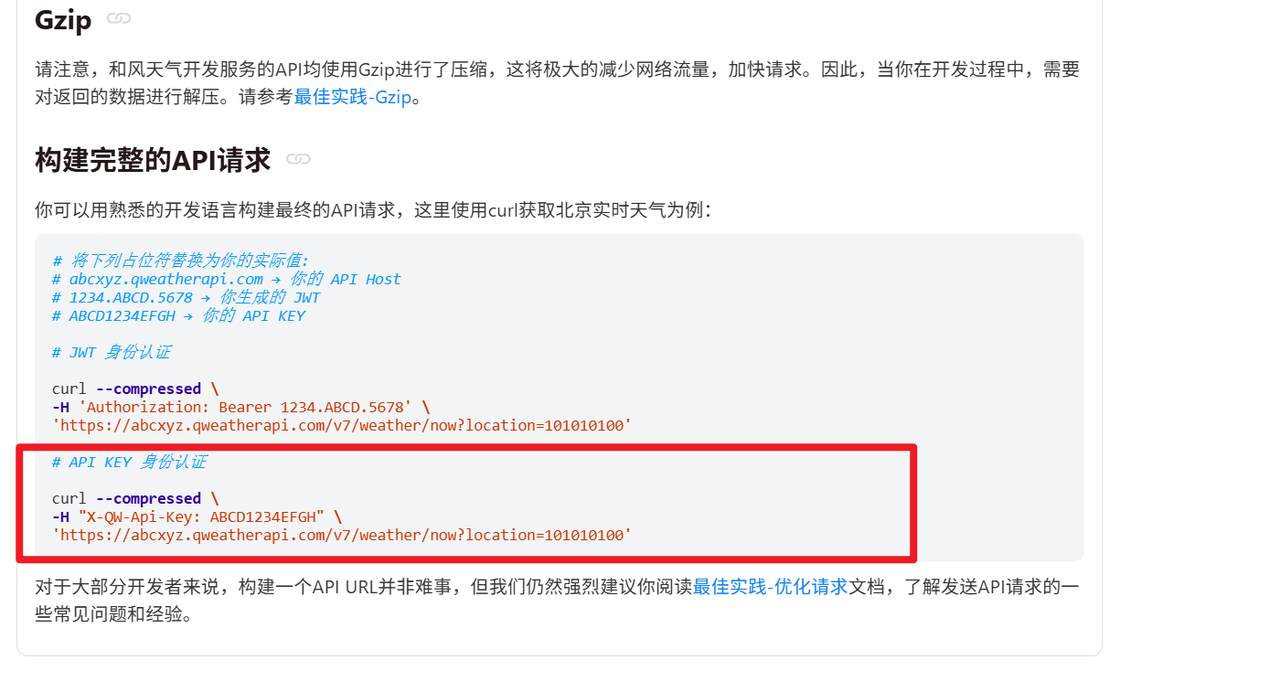
3 测试验证
ubuntu系统:
curl --compressed \
  -H "X-QW-Api-Key: 9ef68fe55401485180dd968fac902300" \
  "https://m7487r6ych.re.qweatherapi.com/v7/weather/3d?location=101010100"
windows系统:
curl --compressed -H "X-QW-Api-Key: 9ef68fe55401485180dd968fac902300" "https://m7487r6ych.re.qweatherapi.com/v7/weather/30d?location=101010100"
python代码:
import requests
import gzip
import json

# 配置(使用自己的密钥)
API_KEY = "9ef68fe55401485180dd968fac902300"
url = "https://m7487r6ych.re.qweatherapi.com/v7/weather/30d?location=101010100"  # 北京30天预报
headers = {
    "X-QW-Api-Key": API_KEY,
    "Accept-Encoding": "gzip"  # 请求gzip,但不强制
}
try:
    print("正在请求API...")
    response = requests.get(url, headers=headers, timeout=10)
    data = response.text
    parsed_data = json.loads(data)
    print("直接解析成功!")
    print(parsed_data)
except requests.RequestException as e:
    print(f"直接解析失败哦: {e}")
TIPS:
数据传输格式:gzip
适用条件:数据是可压缩的(如 JSON、HTML、文本),网络带宽有限,或高并发场景。默认情况下,如果不设置 Accept-Encoding,服务器通常不压缩。
好处:降低延迟、节省带宽、提升用户体验。
官网介绍:https://dev.qweather.com/docs/best-practices/gzip/
二、数据定时更新
1 导包及配置
以下配置是关于天气API配置以及数据库配置,通过爬虫爬取天气信息网站存储到数据库用于作为A2A检索数据库。
位置:SmartVoyage/utils/spider_weather.py
import requests
import mysql.connector
from datetime import datetime, timedelta
import schedule
import time
import json
import gzip
import pytz
from SmartVoyage.config import Config

conf = Config()

# 配置
API_KEY = "5ef0a47e161a4ea997227322317eae83"
city_codes = {
    "北京": "101010100",
    "上海": "101020100",
    "广州": "101280101",
    "深圳": "101280601"
}
BASE_URL = "https://m7487r6ych.re.qweatherapi.com/v7/weather/30d"
TZ = pytz.timezone('Asia/Shanghai')  # 使用上海时区

# MySQL 配置
db_config = {
    "host": conf.host,
    "user": conf.user,
    "password": conf.password,
    "database": conf.database,
    "charset": "utf8mb4"
}
2 连接数据库
connect_db函数
目标:建立 MySQL 数据库连接。
功能:使用 db_config 配置连接 MySQL,返回连接对象
输入输出:
输入:无。
输出:mysql.connector.connection.MySQLConnection 对象。
测试:
if __name__ == '__main__':
conn = connect_db()
print(conn.is_connected())
print("数据库连接成功!")
conn.close()
3 爬取数据
fetch_weather_data函数用于天气数据的爬取与解析。
目标:从和风天气 API 获取 30 天天气预报数据。
功能:发送 GET 请求,处理 gzip 压缩,解析 JSON 返回数据。
输入输出:
输入:city(字符串,如“北京”),location(字符串,如“101010100”)。
输出:JSON 字典(包含 daily 预报列表)或 None。
def fetch_weather_data(city, location):
headers = {
"X-QW-Api-Key": API_KEY,
"Accept-Encoding": "gzip"
}
url = f"{BASE_URL}?location={location}"
try:
response = requests.get(url, headers=headers, timeout=10)
response.raise_for_status()
if response.headers.get('Content-Encoding') == 'gzip':
data = gzip.decompress(response.content).decode('utf-8')
else:
data = response.text
return json.loads(data)
except requests.RequestException as e:
print(f"请求 {city} 天气数据失败: {e}")
return None
except json.JSONDecodeError as e:
print(f"{city} JSON 解析错误: {e}, 响应内容: {response.text[:500]}...")
return None
except gzip.BadGzipFile:
print(f"{city} 数据未正确解压,尝试直接解析: {response.text[:500]}...")
return json.loads(response.text) if response.text else None
测试:
if __name__ == "__main__":
weather_data = fetch_weather_data("北京", city_codes["北京"])
print(weather_data)
print("解析成功!")
4 查询数据更新时间
get_latest_update_time函数
目标:查询数据库中指定城市的最新更新时间。
功能:执行 SQL 查询,返回 weather_data 表中 city 的最新 update_time。
输入输出:
输入:cursor(MySQL 游标),city(字符串,如“北京”)。
输出:datetime 对象或 None。
def get_latest_update_time(cursor, city):
cursor.execute("SELECT MAX(update_time) FROM weather_data WHERE city = %s", (city,))
result = cursor.fetchone()
return result[0] if result[0] else None
测试:
if __name__ == "__main__":
# 建立数据库连接
conn = connect_db()
cursor = conn.cursor()
# 获取北京城市的最新更新的时间日期
print(get_latest_update_time(cursor, '北京'))
# 关闭数据库连接
cursor.close()
conn.close()
5 是否需要更新
should_update_data函数
目标:判断是否需要更新城市天气数据。
功能:检查最新更新时间是否超过 1 天,或强制更新。
输入输出:
输入:latest_time(datetime 或 None),force_update(布尔值)。
输出:布尔值(True/False)。
def should_update_data(latest_time, force_update=False):
if force_update:
return True
if latest_time is None:
return True
# 时区问题:确保 latest_time 有时区信息
if latest_time and latest_time.tzinfo is None:
latest_time = latest_time.replace(tzinfo=TZ)
current_time = datetime.now(TZ)
return (current_time - latest_time) > timedelta(days=1)
测试:
if __name__ == "__main__":
from datetime import datetime, timedelta
import pytz
# 设置时区
TZ = pytz.timezone('Asia/Shanghai')
# 模拟一个2天前的更新时间
latest = datetime.now(TZ) - timedelta(days=2)
print("========模拟一个两天前的时间==============")
print(latest)
# 测试是否需要更新数据
print(should_update_data(latest))
# 根据更新判断结果输出相应信息
if should_update_data(latest):
print(f"需要更新数据,上次更新时间:{latest}")
else:
print("没有数据,需要更新数据!")
6 存储数据
store_weather_data函数
目标:写入或更新天气预报数据到数据库。
功能:循环预报数据,使用 INSERT ON DUPLICATE KEY UPDATE 插入/更新 weather_data 表。
输入输出:
输入:数据库连接、mysql游标,城市、数据。
输出:无,数据库更新。
def store_weather_data(conn, cursor, city, data):
if not data or data.get("code") != "200":
print(f"{city} 数据无效,跳过存储。")
return
daily_data = data.get("daily", [])
update_time = datetime.fromisoformat(data.get("updateTime").replace("+08:00", "+08:00")).replace(tzinfo=TZ)
for day in daily_data:
fx_date = datetime.strptime(day["fxDate"], "%Y-%m-%d").date()
values = (
city, fx_date,
day.get("sunrise"), day.get("sunset"),
day.get("moonrise"), day.get("moonset"),
day.get("moonPhase"), day.get("moonPhaseIcon"),
day.get("tempMax"), day.get("tempMin"),
day.get("iconDay"), day.get("textDay"),
day.get("iconNight"), day.get("textNight"),
day.get("wind360Day"), day.get("windDirDay"), day.get("windScaleDay"), day.get("windSpeedDay"),
day.get("wind360Night"), day.get("windDirNight"), day.get("windScaleNight"), day.get("windSpeedNight"),
day.get("precip"), day.get("uvIndex"),
day.get("humidity"), day.get("pressure"),
day.get("vis"), day.get("cloud"),
update_time
)
insert_query = """
INSERT INTO weather_data (
city, fx_date, sunrise, sunset, moonrise, moonset, moon_phase, moon_phase_icon,
temp_max, temp_min, icon_day, text_day, icon_night, text_night,
wind360_day, wind_dir_day, wind_scale_day, wind_speed_day,
wind360_night, wind_dir_night, wind_scale_night, wind_speed_night,
precip, uv_index, humidity, pressure, vis, cloud, update_time
) VALUES (%s, %s, %s, %s, %s, %s, %s, %s, %s, %s, %s, %s, %s, %s, %s, %s, %s, %s, %s, %s, %s, %s, %s, %s, %s, %s, %s, %s, %s)
ON DUPLICATE KEY UPDATE
sunrise = VALUES(sunrise), sunset = VALUES(sunset), moonrise = VALUES(moonrise),
moonset = VALUES(moonset), moon_phase = VALUES(moon_phase), moon_phase_icon = VALUES(moon_phase_icon),
temp_max = VALUES(temp_max), temp_min = VALUES(temp_min), icon_day = VALUES(icon_day),
text_day = VALUES(text_day), icon_night = VALUES(icon_night), text_night = VALUES(text_night),
wind360_day = VALUES(wind360_day), wind_dir_day = VALUES(wind_dir_day), wind_scale_day = VALUES(wind_scale_day),
wind_speed_day = VALUES(wind_speed_day), wind360_night = VALUES(wind360_night),
wind_dir_night = VALUES(wind_dir_night), wind_scale_night = VALUES(wind_scale_night),
wind_speed_night = VALUES(wind_speed_night), precip = VALUES(precip), uv_index = VALUES(uv_index),
humidity = VALUES(humidity), pressure = VALUES(pressure), vis = VALUES(vis),
cloud = VALUES(cloud), update_time = VALUES(update_time)
"""
try:
cursor.execute(insert_query, values)
print(f"{city} {fx_date} 数据写入/更新成功: {day.get('textDay')}, 影响行数: {cursor.rowcount}")
conn.commit()
print(f"{city} 事务提交完成。")
except mysql.connector.Error as e:
print(f"{city} {fx_date} 数据库错误: {e}")
conn.rollback()
print(f"{city} 事务回滚。")
测试:
if __name__ == "__main__":
conn = connect_db()
cursor = conn.cursor()
data = fetch_weather_data("北京", "101010100")
store_weather_data(conn, cursor, "北京", data)
print("数据存储完成。")
7 更新数据
update_weather函数
目标:更新所有城市数据。
功能:查看是否满足更新条件,调用数据存储与数据爬取。
输入输出:
输入:更新条件
输出:无,数据库更新。
def update_weather(force_update=False):
conn = connect_db()
cursor = conn.cursor()
for city, location in city_codes.items():
latest_time = get_latest_update_time(cursor, city)
if should_update_data(latest_time, force_update):
print(f"开始更新 {city} 天气数据...")
data = fetch_weather_data(city, location)
if data:
store_weather_data(conn, cursor, city, data)
else:
print(f"{city} 数据已为最新,无需更新。最新更新时间: {latest_time}")
cursor.close()
conn.close()
测试:
8 定时更新
setup_scheduler函数
目标:设置定时任务,每天在 PDT 16:00(北京时间 01:00)调用 update_weather 函数。保证数据的实时性。
功能:
使用 schedule 库注册每日任务。
进入无限循环,检查并运行待执行任务,每 60 秒检查一次。
项目中的定位:确保天气数据定时更新,保持 weather_data 表的数据新鲜,支持 weather_server.py 和 mcp_weather_server.py 查询。
def setup_scheduler():
# 北京时间 1:00 对应 PDT 前一天的 16:00(夏令时)
schedule.every().day.at("16:00").do(update_weather)
while True:
schedule.run_pending()
time.sleep(60)
原理测试:
from datetime import datetime, timedelta
import time
import schedule
now = datetime.now()
trigger_time = (now + timedelta(seconds=20)).strftime("%H:%M:%S")
print(f"[测试日志] 当前时间: {now}")
print(f"[测试日志] 设置任务在 {trigger_time} 触发 update_weather")
# 使用 lambda 延迟执行
schedule.every().day.at(trigger_time).do(lambda: print("任务已触发!"))
# 运行 30 秒以观察任务触发
end_time = now + timedelta(seconds=60)
while datetime.now() < end_time:
schedule.run_pending()
print(f"[测试日志] 检查待执行任务: {datetime.now()}")
time.sleep(1)
9 完整代码
位置:SmartVoyage/utils/spider_weather.py
import requests
import mysql.connector
from datetime import datetime, timedelta
import schedule
import time
import json
import gzip
import pytz
# 配置
API_KEY = "5ef0a47e161a4ea997227322317eae83"
city_codes = {
"北京": "101010100",
"上海": "101020100",
"广州": "101280101",
"深圳": "101280601"
}
BASE_URL = "https://m7487r6ych.re.qweatherapi.com/v7/weather/30d"
TZ = pytz.timezone('Asia/Shanghai') # 使用上海时区
# MySQL 配置
db_config = {
"host": "localhost",
"user": "root",
"password": "123456",
"database": "travel_rag",
"charset": "utf8mb4"
}
def connect_db():
    return mysql.connector.connect(**db_config)
def fetch_weather_data(city, location):
    headers = {
        "X-QW-Api-Key": API_KEY,
        "Accept-Encoding": "gzip"
    }
    url = f"{BASE_URL}?location={location}"
    try:
        response = requests.get(url, headers=headers, timeout=10)
        response.raise_for_status()
        if response.headers.get('Content-Encoding') == 'gzip':
            data = gzip.decompress(response.content).decode('utf-8')
        else:
            data = response.text
        return json.loads(data)
    except requests.RequestException as e:
        print(f"请求 {city} 天气数据失败: {e}")
        return None
    except json.JSONDecodeError as e:
        print(f"{city} JSON 解析错误: {e}, 响应内容: {response.text[:500]}...")
        return None
    except gzip.BadGzipFile:
        print(f"{city} 数据未正确解压,尝试直接解析: {response.text[:500]}...")
        return json.loads(response.text) if response.text else None
def get_latest_update_time(cursor, city):
    cursor.execute("SELECT MAX(update_time) FROM weather_data WHERE city = %s", (city,))
    result = cursor.fetchone()
    return result[0] if result[0] else None
def should_update_data(latest_time, force_update=False):
if force_update:
return True
if not latest_time:
return True
current_time = datetime.now(TZ)
latest_time = latest_time.replace(tzinfo=TZ)
return (current_time - latest_time).total_seconds() / 3600 >= 24
def store_weather_data(conn, cursor, city, data):
    if not data or data.get("code") != "200":
        print(f"{city} 数据无效,跳过存储。")
        return

    daily_data = data.get("daily", [])
    update_time = datetime.fromisoformat(data.get("updateTime").replace("+08:00", "+08:00")).replace(tzinfo=TZ)

    for day in daily_data:
        fx_date = datetime.strptime(day["fxDate"], "%Y-%m-%d").date()
        values = (
            city, fx_date,
            day.get("sunrise"), day.get("sunset"),
            day.get("moonrise"), day.get("moonset"),
            day.get("moonPhase"), day.get("moonPhaseIcon"),
            day.get("tempMax"), day.get("tempMin"),
            day.get("iconDay"), day.get("textDay"),
            day.get("iconNight"), day.get("textNight"),
            day.get("wind360Day"), day.get("windDirDay"), day.get("windScaleDay"), day.get("windSpeedDay"),
            day.get("wind360Night"), day.get("windDirNight"), day.get("windScaleNight"), day.get("windSpeedNight"),
            day.get("precip"), day.get("uvIndex"),
            day.get("humidity"), day.get("pressure"),
            day.get("vis"), day.get("cloud"),
            update_time
        )
        insert_query = """
        INSERT INTO weather_data (
            city, fx_date, sunrise, sunset, moonrise, moonset, moon_phase, moon_phase_icon,
            temp_max, temp_min, icon_day, text_day, icon_night, text_night,
            wind360_day, wind_dir_day, wind_scale_day, wind_speed_day,
            wind360_night, wind_dir_night, wind_scale_night, wind_speed_night,
            precip, uv_index, humidity, pressure, vis, cloud, update_time
        ) VALUES (%s, %s, %s, %s, %s, %s, %s, %s, %s, %s, %s, %s, %s, %s, %s, %s, %s, %s, %s, %s, %s, %s, %s, %s, %s, %s, %s, %s, %s)
        ON DUPLICATE KEY UPDATE
            sunrise = VALUES(sunrise), sunset = VALUES(sunset), moonrise = VALUES(moonrise),
            moonset = VALUES(moonset), moon_phase = VALUES(moon_phase), moon_phase_icon = VALUES(moon_phase_icon),
            temp_max = VALUES(temp_max), temp_min = VALUES(temp_min), icon_day = VALUES(icon_day),
            text_day = VALUES(text_day), icon_night = VALUES(icon_night), text_night = VALUES(text_night),
            wind360_day = VALUES(wind360_day), wind_dir_day = VALUES(wind_dir_day), wind_scale_day = VALUES(wind_scale_day),
            wind_speed_day = VALUES(wind_speed_day), wind360_night = VALUES(wind360_night),
            wind_dir_night = VALUES(wind_dir_night), wind_scale_night = VALUES(wind_scale_night),
            wind_speed_night = VALUES(wind_speed_night), precip = VALUES(precip), uv_index = VALUES(uv_index),
            humidity = VALUES(humidity), pressure = VALUES(pressure), vis = VALUES(vis),
            cloud = VALUES(cloud), update_time = VALUES(update_time)
        """
        try:
            cursor.execute(insert_query, values)
            print(f"{city} {fx_date} 数据写入/更新成功: {day.get('textDay')}, 影响行数: {cursor.rowcount}")
            conn.commit()
            print(f"{city} 事务提交完成。")
        except mysql.connector.Error as e:
            print(f"{city} {fx_date} 数据库错误: {e}")
            conn.rollback()
            print(f"{city} 事务回滚。")
def update_weather(force_update=False):
    conn = connect_db()
    cursor = conn.cursor()

    for city, location in city_codes.items():
        latest_time = get_latest_update_time(cursor, city)
        if should_update_data(latest_time, force_update):
            print(f"开始更新 {city} 天气数据...")
            data = fetch_weather_data(city, location)
            if data:
                store_weather_data(conn, cursor, city, data)
        else:
            print(f"{city} 数据已为最新,无需更新。最新更新时间: {latest_time}")

    cursor.close()
    conn.close()
def setup_scheduler():
    # 北京时间 1:00 对应 PDT 前一天的 16:00(夏令时)
    schedule.every().day.at("16:00").do(update_weather)
    while True:
        schedule.run_pending()
        time.sleep(60)
if __name__ == "__main__":
# 初始检查和更新
with mysql.connector.connect(**db_config) as conn:
cursor = conn.cursor()
cursor.execute("""
CREATE TABLE IF NOT EXISTS weather_data (
id INT AUTO_INCREMENT PRIMARY KEY,
city VARCHAR(50) NOT NULL COMMENT '城市名称',
fx_date DATE NOT NULL COMMENT '预报日期',
sunrise TIME COMMENT '日出时间',
sunset TIME COMMENT '日落时间',
moonrise TIME COMMENT '月升时间',
moonset TIME COMMENT '月落时间',
moon_phase VARCHAR(20) COMMENT '月相名称',
moon_phase_icon VARCHAR(10) COMMENT '月相图标代码',
temp_max INT COMMENT '最高温度',
temp_min INT COMMENT '最低温度',
icon_day VARCHAR(10) COMMENT '白天天气图标代码',
text_day VARCHAR(20) COMMENT '白天天气描述',
icon_night VARCHAR(10) COMMENT '夜间天气图标代码',
text_night VARCHAR(20) COMMENT '夜间天气描述',
wind360_day INT COMMENT '白天风向360角度',
wind_dir_day VARCHAR(20) COMMENT '白天风向',
wind_scale_day VARCHAR(10) COMMENT '白天风力等级',
wind_speed_day INT COMMENT '白天风速 (km/h)',
wind360_night INT COMMENT '夜间风向360角度',
wind_dir_night VARCHAR(20) COMMENT '夜间风向',
wind_scale_night VARCHAR(10) COMMENT '夜间风力等级',
wind_speed_night INT COMMENT '夜间风速 (km/h)',
precip DECIMAL(5,1) COMMENT '降水量 (mm)',
uv_index INT COMMENT '紫外线指数',
humidity INT COMMENT '相对湿度 (%)',
pressure INT COMMENT '大气压强 (hPa)',
vis INT COMMENT '能见度 (km)',
cloud INT COMMENT '云量 (%)',
update_time DATETIME COMMENT '数据更新时间',
UNIQUE KEY unique_city_date (city, fx_date)
) ENGINE=InnoDB DEFAULT CHARSET=utf8mb4 COLLATE=utf8mb4_unicode_ci COMMENT='天气数据表'
""")
conn.commit()
# 立即执行一次更新
update_weather()
# 启动定时任务
setup_scheduler()
本节小结
本节主要描述了smartVoyage天气数据从采集到定时更新入库的全过程。